


SONIC Drive-In - Order Online
4.692.75K Reviews
App Specs
- Version
- 2026.16.13
- Updated On
- License
- Free
- Downloads
- 10,000,000+
- Developer
- Sonic Industries Services, Inc.
- Categories
- Food & Drink
- Platform
- Android, iOS
Screenshots


 Analysis by AppCompare
Sharing a SONIC run with other people sounds simple until everyone wants something different, someone is paying, and the person driving needs to keep their attention on the road. I like that SONIC Drive-In - Order Online gives a household another way to plan pickup instead of making one person relay every request at a speaker. It works best as a practical ordering tool for people who already choose SONIC; it is less compelling if you are looking for a broad restaurant directory or a way to compare nearby food options.
When one order has several people behind it
Picture an ordinary evening: I’m heading home, two people at home want dinner, and we’re trying to avoid a last-minute round of calls from the car. The useful move is to settle the choices before placing the order, then check the customized items carefully as they go in. Burgers, sides, drinks, and individual changes can make a shared order easy to mix up, so I would treat the review step as part of the workflow rather than rushing straight to checkout.
That is where the app’s focus matters. It is built around SONIC ordering, not around collecting menus from every restaurant in town. If everyone already agrees on SONIC, a single coordinated pickup can be simpler than separate orders through a general delivery service. If the group is still debating between several restaurants, a broader food app may be a better first stop; this one is most useful once the decision has been made.
Set up the account around the person placing the order
For a shared phone or tablet, I would decide in advance whose account will be used and who is allowed to place or change orders. Saved order history can speed up repeat visits, but it also makes it sensible to distinguish a household favorite from what one person happens to buy. Before reusing an old order, check the contents and customizations instead of assuming that everyone wants the same thing this time.
The app is free, and SONIC Industries Services, Inc. is the developer. It is a food-and-drink app with an Everyone content rating, which makes its intended audience broad, but that rating does not settle household questions about account access, payment, or who should place an order. I would keep those decisions with the adult or account holder, especially when children are using a shared device. That is a sensible boundary for any ordering app, not a family-control feature I would expect this one to provide.
Make pickup coordination less awkward
Pickup choices can help match the plan to the people in the car. If I’m driving, ordering before setting off and choosing the pickup method that fits the visit is more useful than trying to manage a complicated order while arriving. When several people are meeting at the restaurant, it also helps to agree on who will collect the food and watch for order updates, rather than having everyone assume someone else is handling it.
There is a trade-off: ordering ahead can reduce the need to decide at the counter, but it does not remove the need to confirm the selected location, pickup option, and order details. A saved routine is convenient only when the current plan matches it. For a changing group or an unfamiliar stop, I would slow down and verify each choice before submitting.
Worth Reading Before You Choose

Baby Panda World Brings Quick Play to Modern Phones, but Its Game Library Feels Busy

ESPN’s Live Game View Makes Following Close Games Easier

QuizzLand Review: A Good Fit for Short Trivia Breaks, Not Every Player

Basketball Stars: Multiplayer Is Fast, but Can It Recover When Matches Go Wrong?

WEBTOON Turns Phone Updates Into a Better Reading Routine

Link to Windows Runs on Shared Habits, Not Social Feeds
Why You Need This App in Your Life
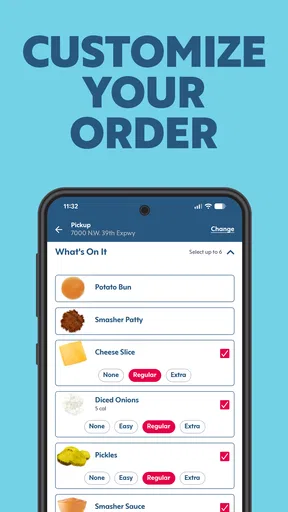
First off, let’s talk about convenience. We live in a world where time is money, and who has time to wait in endless lines? With the SONIC Drive-In - Order Online app, you can order your favorite meals with just a few taps. You can even customize your order exactly how you want. Want extra cheese on that burger or maybe a cherry in your limeade? No problem!
Features That Make It Stand Out
One of my favorite aspects of this app is the user-friendly interface. It’s super intuitive, which means even if you’re not tech-savvy, you’ll still find it a breeze to navigate. The menu is neatly organized into categories, making it easy to find what you’re craving. Plus, the app remembers your past orders, so reordering that perfect meal is just a tap away.
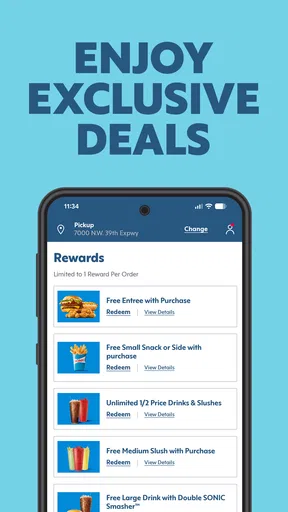
Now, let’s talk about the rewards program. I mean, who doesn’t love getting freebies, right? With every order you make, you earn points that can be redeemed for discounts or free items. It’s like getting rewarded for eating, which in my book, is a total win-win.
The Ordering Experience
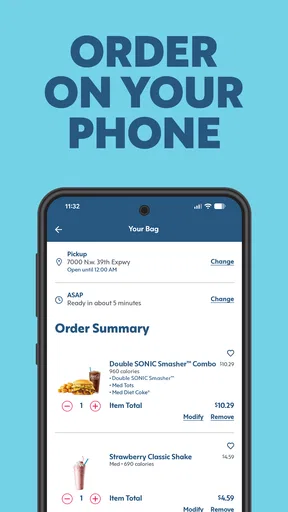
Ordering through the app is smooth sailing. Once you’ve customized your order, you can select your preferred pick-up method. Whether you want to grab it through the drive-thru, park and have it brought to your car, or even walk in and pick it up, the app accommodates your preferences. And here’s a little insider tip: ordering ahead can sometimes save you from those peak hour rushes!
One thing that really stands out is the real-time updates. You’ll receive notifications about your order status, so you know exactly when it’s ready. No more awkwardly hanging around wondering if it’s your food being prepared. Plus, if you’re a fan of surprises, keep an eye on the app for exclusive deals and promotions that pop up from time to time.
What to expect from rewards and repeat orders
The rewards angle makes most sense when I already plan to order from SONIC regularly. I would not choose a meal just to chase points; I’d treat rewards as a bonus on an order I wanted anyway. Before relying on a particular offer, check its terms in the app and make sure it applies to the order you are placing. That small habit avoids building a shared dinner plan around a promotion that may not fit everyone’s choices.
Past orders are handy for familiar meals, but they are a starting point, not a substitute for checking. A previous order can reflect a one-time preference, a different group, or a customization nobody wants today. For households, I find it useful to review each item aloud or against the group’s messages before submitting. That is more reliable than assuming the person who ordered last time remembers every detail.
Age, trust, and everyday judgement
The Everyone rating is a useful sign that the app is intended for a general audience, but it does not mean every household should hand over an unlocked device and payment access. If a younger family member helps choose food, I would keep the account holder involved in the final review and submission. The practical distinction is between browsing or suggesting items and authorizing an order; families can set that boundary themselves without expecting the app to enforce it.
For privacy and account handling, I would use the same care as with any restaurant app: avoid leaving a signed-in account open on a device other people borrow, and check who can access saved details before sharing the phone. I would not make assumptions about protections or household profiles. If the device is shared among adults, agreeing on a simple rule—one person submits, everyone checks their own items—can prevent accidental changes and confusion over whose order is whose.
Where this fits among food-ordering options
Compared with a delivery marketplace, the main appeal here is staying within SONIC’s own ordering experience and arranging pickup in the ways the app offers. That can be a better fit when you are already near a SONIC or prefer collecting the order yourself. A general delivery app may be more useful when the group wants restaurant variety or needs delivery from places beyond SONIC. The right choice depends less on which app is universally better and more on whether the restaurant and pickup plan are already settled.
I would also choose a direct restaurant app over a marketplace when I want to browse that restaurant’s menu and handle a repeat order in one place. On the other hand, if I need to compare different restaurants, delivery availability, or several menus before deciding, this focused app is not designed for that broader task. It is a specialist rather than an all-purpose food planner, and that focus is both its strength and its limit.
Small habits that make the app more useful
For a smoother shared order, I would gather everyone’s choices first, assign one person to enter them, and check customizations item by item before placing the order. If the group has a regular favorite, a past order can save time, but I would still confirm every detail and the intended pickup choice. Ordering before reaching the restaurant is useful when the timing is predictable; if plans are uncertain, waiting until the group is ready may reduce the chance of needing to change the order.
Notifications can help the person collecting food keep track of progress, but I would make sure that person is the one watching the device. In a car, the driver should not be the one reading updates or editing an order while moving. A passenger can handle that coordination, or the driver can check before setting off and once safely parked. This is a small point, but it matters more than shaving a few taps off the process.
Who will appreciate it, and who may not
I’d recommend it to regular SONIC customers who want to customize food, repeat familiar orders, earn rewards, and arrange pickup without placing everything at the counter. It can also suit a household with a clear ordering routine: one person gathers requests, checks the basket, and handles collection. The app’s free price makes trying it low-commitment, though the value still depends on whether SONIC fits your usual meals and locations.
I would skip it if I rarely visit SONIC, need a single app to compare many restaurants, or rely on delivery as the only workable option. It is also not the best tool for a group that cannot agree on a restaurant yet. In those situations, a marketplace or a direct conversation before opening any ordering app will do more to solve the problem.
Useful details before installing
The app first appeared on July 15, 2014, and its current version is 8.6.13. It requires iOS 11 or later, so an older Apple device may need an operating-system update before it can run. SONIC Drive-In has an average rating of 4.6 from around 758,000 ratings, with about 92,000 written reviews and over 10 million installs. Those figures suggest it is widely used, but I would still judge it by whether its ordering flow suits my own routine.
Because the app is free, the decision is mainly about fit rather than an upfront purchase. I would check that the version available for my device supports the operating system it is running, then use a first order to learn the pickup flow before depending on it for a busy group meal. That first run is a good chance to confirm how the selected pickup option works at the location you plan to visit and to see whether the app’s pacing suits your schedule.
Final Thoughts
All in all, the SONIC Drive-In - Order Online app is a must-have for anyone who loves convenience and delicious food. It saves you time, rewards you for your loyalty, and makes the entire fast-food experience more enjoyable. If you haven’t tried it yet, I suggest giving it a go. Your taste buds and your wallet will thank you!
And there you have it, folks! An app that brings the drive-in experience to your fingertips. Go ahead, download it, and let the culinary adventures begin. Happy eating!
My household verdict
For a shared-device household, I see this as a useful ordering channel, not a household organizer. Its strongest role is helping people who already want SONIC turn a group of preferences into a pickup order, with repeat orders and rewards as useful extras. The safest routine is straightforward: agree on the meal, let the account holder review and submit it, and have one person manage pickup updates.
I would choose another option when restaurant choice is still open, when delivery is essential, or when a shared account would create more confusion than convenience. For everyone else, the focused menu and pickup choices can make a familiar stop easier to coordinate. If that matches how your household eats, I think it is worth trying; just keep the final order check in the routine, especially when several people are counting on the same bag.
Pros
- Easy-to-use interface for quick ordering.
- Customizable menu options for personal preferences.
- Location-based services for convenience.
- Frequent updates with new features.
- Rewards program for loyal customers.
Cons
- Limited delivery areas reduce accessibility.
- Occasional app crashes during peak times.
- Some features require location permissions.
- In-app ads can be intrusive at times.
- Menu images sometimes fail to load.
FAQs for SONIC Drive-In - Order Online
What features does the SONIC Drive-In app offer?
The SONIC Drive-In app provides a range of features to enhance your dining experience. You can place orders online, customize your meals, find the nearest locations, and even enjoy exclusive deals and promotions. The app also allows you to pay directly from your phone, making the process quick and convenient.
How does the order customization work in the app?
The app allows you to fully customize your order, ensuring you get exactly what you want. You can modify ingredients, add extra toppings, and select your preferred sizes. This feature is particularly useful for those with specific dietary preferences or allergies, as it provides detailed control over your meal.
Are there any exclusive deals available on the app?
Yes, the SONIC Drive-In app frequently offers exclusive deals and promotions for app users. These include discounts, special offers, and rewards that are not available in-store or through other channels. Make sure to check the app regularly to take advantage of these deals and save on your orders.
How does the payment process work in the app?
The app provides a secure and seamless payment process. You can add your preferred payment method, such as a credit or debit card, and use it to pay for your orders directly through the app. This is designed to save time and reduce the hassle of paying at the drive-in or counter.
Can I use the app to find nearby SONIC locations?
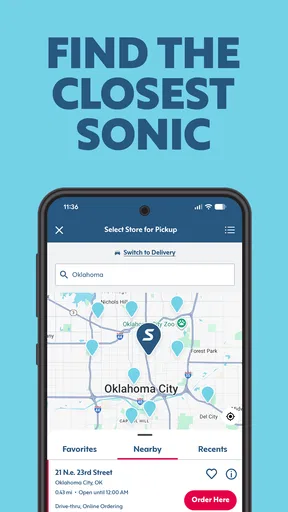
Yes, the app includes a location finder feature that helps you locate the nearest SONIC Drive-In restaurants. It provides detailed information such as address, distance, and contact details. This is especially handy when you're traveling or in an unfamiliar area and need to find a SONIC nearby.


